Micro-frontends split a large frontend application into independently owned and, in some architectures, independently deployable parts. This can reduce coordination costs when multiple teams work on different business domains, but it also introduces new problems around runtime dependencies, testing, observability, performance, security, and version management.
That distinction matters.
Micro-frontends are not simply “microservices for the browser,” nor are they automatically the next step after a monolithic frontend. A modular monolith, monorepo, shared component architecture, or conventional SPA can remain a better fit when a product has a small number of teams or requires tightly coordinated releases.
For large organizations, the real question is not “Can we build a micro-frontend?” but:
Does independent frontend ownership and deployment create enough organizational value to justify the additional technical complexity?
This guide examines that question from an architectural and operational perspective.
Quick Answer
Micro-frontends make the most sense when:
- multiple teams own clearly defined business domains;
- teams need meaningful release independence;
- different parts of the product have different development lifecycles;
- the organization can support independent testing, deployment, observability, and ownership;
- frontend coordination has become a measurable organizational bottleneck.
They are less compelling when:
- one team owns most of the application;
- releases are already fast;
- the application has a small codebase;
- components share extensive state and business logic;
- performance requirements are extremely sensitive to JavaScript and network overhead;
- the organization lacks the operational infrastructure required to manage distributed frontend systems.
The architectural decision should therefore be based on team boundaries, deployment requirements, domain ownership, and operational cost, rather than the size of the JavaScript bundle alone.
1. Why Large Frontends Become Difficult
A large frontend does not necessarily become problematic simply because it contains a lot of code.
The deeper problem is usually coordination.
Consider an enterprise application with:
- 300 developers;
- 20 product teams;
- a shared authentication system;
- several business domains;
- weekly or daily releases;
- multiple frontend frameworks accumulated through acquisitions;
- a common design system;
- hundreds of internal dependencies.
The technical problem is no longer simply:
“How do we render this page?”
It becomes:
“How can 20 teams change different parts of the product without constantly blocking one another?”
Several forms of friction can emerge.
Coordination Cost
A change to one part of the application may require reviews from several teams.
A simple UI change can therefore become an organizational dependency problem.
Framework and Dependency Coupling
Large applications often accumulate dependencies over many years.
One team wants to upgrade React.
Another depends on an older library.
A third team cannot migrate because of a legacy integration.
The result is not necessarily a technical limitation of the framework itself. It is often a consequence of shared ownership.
Build and Deployment Coupling
A monolithic frontend can require the entire application to be built and deployed even when only one domain has changed.
This can make independent release cycles difficult.
However, this problem can sometimes be solved without micro-frontends.
A monorepo with independent packages, incremental builds, strong ownership rules, and independent deployment pipelines may address much of the same organizational friction.
That is why micro-frontends should not be the first architectural response to every large frontend.
2. Micro-Frontend Architecture Explained
A micro-frontend architecture divides the frontend according to business or organizational boundaries.
For example:
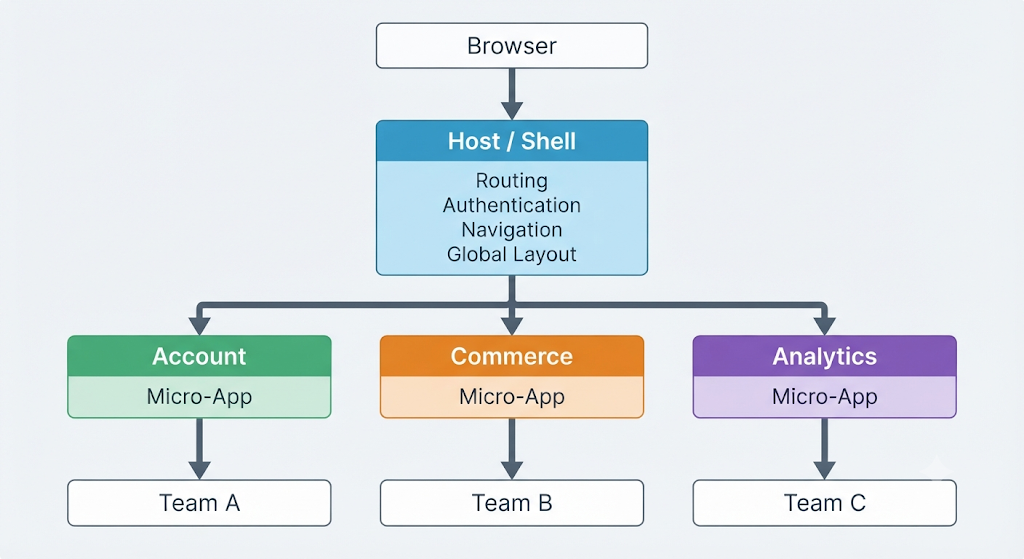
The important characteristic is not simply that the application has several components.
It is that those components can have separate ownership boundaries.
Depending on the implementation, they may also have:
- separate repositories;
- separate build pipelines;
- separate deployment schedules;
- different technology stacks;
- separate runtime lifecycles.
This creates organizational independence, but it also creates technical boundaries that must be deliberately managed.
3. Micro-Frontend vs Monolith vs Monorepo
One of the most common architectural mistakes is treating these as a simple progression:
Monolith
   ↓
Monorepo
   ↓
Micro-frontends
They solve different problems.
| Architecture | Ownership | Deployment | Complexity | Typical Strength |
|---|---|---|---|---|
| Monolithic frontend | Centralized | Usually unified | Lower | Simplicity |
| Modular monolith | Domain-oriented | Usually unified | Low–Medium | Strong internal boundaries |
| Monorepo | Multiple teams possible | Can be independent | Medium | Shared tooling + ownership |
| Micro-frontends | Strongly decentralized | Potentially independent | High | Team autonomy |
| iframe-based apps | Highly isolated | Independent | High in UX integration | Strong isolation |
A monorepo does not automatically mean a monolith.
Likewise, a micro-frontend architecture does not require separate repositories.
The critical distinction is the degree of runtime and deployment independence.
4. The Major Micro-Frontend Integration Patterns
There is no single micro-frontend architecture.
Several integration strategies are commonly used.
4.1 Build-Time Integration
The simplest approach is to publish frontend functionality as packages.
For example:
design-system
checkout-ui
account-ui
analytics-ui
       ↓
    npm packages
       ↓
    Host App
The host application imports the packages during its build.
Advantages
- simple dependency model;
- familiar tooling;
- easier testing;
- predictable runtime;
- fewer runtime failures.
Disadvantages
- the host generally needs to rebuild when the package changes;
- deployment independence is limited;
- dependency upgrades can still create coordination requirements.
This approach is often underrated.
If independent runtime deployment is not actually required, build-time integration may provide most of the organizational benefits without introducing remote-runtime complexity.
5. Runtime Integration with Module Federation
Module Federation allows separate builds to expose and consume modules at runtime.
Webpack describes each build as a container that can expose modules and consume modules from other containers. Remote modules are loaded asynchronously rather than being part of the host’s original build.
Conceptually:
Host Application
      │
      ├── Local Modules
      │
      ├── Remote: Account
      │        ↓
      │   account.example.com
      │
      ├── Remote: Checkout
      │        ↓
      │   checkout.example.com
      │
      └── Remote: Analytics
               ↓
          analytics.example.com
The important architectural property is that the host does not necessarily need to rebuild every time a remote application is deployed.
That can enable a meaningful degree of release independence.
But Runtime Independence Has a Cost
A remote module introduces another runtime dependency.
The browser may now need to:
- load the host;
- discover the remote;
- download remote assets;
- resolve shared dependencies;
- initialize the remote;
- render the application.
A failure in the remote system can therefore become a user-facing failure.
This means Module Federation should be treated as a distributed runtime architecture, not merely a convenient JavaScript bundling feature.
6. Webpack, Vite, Rspack and the 2026 Tooling Landscape
Module Federation is not synonymous with Webpack.
Webpack 5 provides native Module Federation support through its ModuleFederationPlugin.
The broader ecosystem now also supports other build environments, including Rspack and Vite-based implementations. The current Module Federation documentation provides integrations for Webpack, Rspack, Vite, Next.js and other environments.
For Vite projects, Module Federation functionality is provided through federation tooling rather than being a native Vite feature. The current Vite integration supports exposing and consuming federation-compatible modules and configuring shared dependencies.
That distinction matters when documenting an architecture.
A more accurate statement is:
Webpack 5 provides native Module Federation support, while Vite and other build systems can use dedicated Module Federation integrations or plugins.
This avoids incorrectly implying that every build tool implements federation in the same way.
7. Shared Dependencies Are Not Free Performance
One of the most misunderstood aspects of Module Federation is dependency sharing.
A configuration such as:
shared:
  react
  react-dom
can prevent multiple copies of a dependency from being loaded in appropriate runtime configurations.
Webpack’s sharing mechanism uses a share scope to coordinate available versions of shared modules. Multiple versions can also exist depending on dependency configuration and the runtime graph.
Therefore:
“Shared dependencies reduce bundle duplication”
is reasonable.
But:
“Module Federation automatically makes the application faster”
is not.
Performance depends on:
- remote entry loading;
- number of network requests;
- JavaScript execution;
- dependency duplication;
- caching;
- preload strategy;
- remote availability;
- hydration;
- rendering;
- device performance;
- network conditions.
A poorly designed micro-frontend can actually be slower than a monolith.
8. Server-Side Composition and Edge Composition
Not every micro-frontend has to be assembled entirely in the browser.
Another approach is to compose pages on the server or at the edge.
For example:
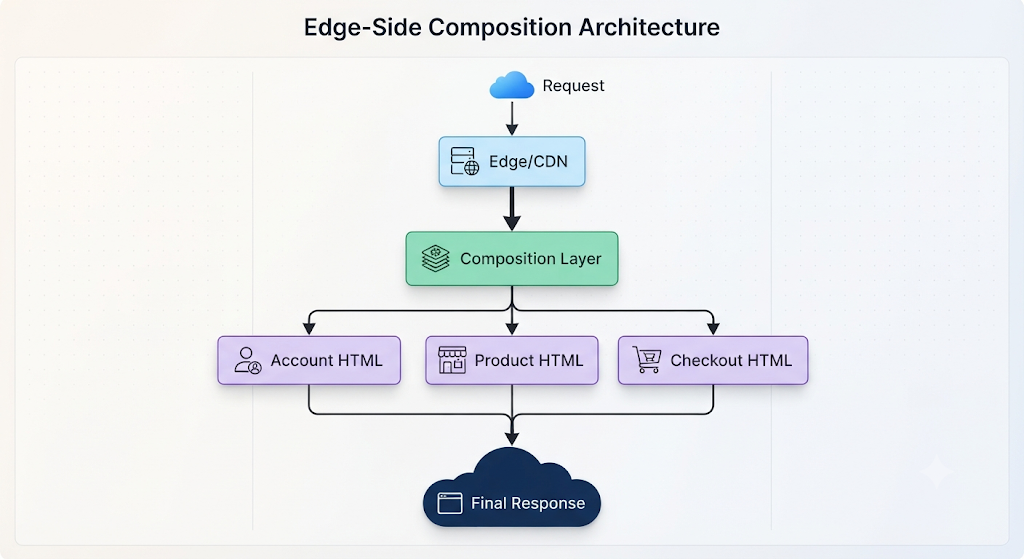
This can be implemented using server-side rendering, edge functions, or other composition mechanisms depending on the technology stack.
Why Consider It?
Server-side composition can allow the browser to receive meaningful HTML earlier and can be useful for applications where initial rendering and crawlability matter.
But it is incorrect to describe server-side composition as automatically providing “exceptional Core Web Vitals and SEO performance.”
Core Web Vitals measure different aspects of real user experience:
- LCP — loading performance;
- INP — interaction responsiveness;
- CLS — visual stability.
Google’s current guidance recommends measuring these metrics at the 75th percentile, with “good” thresholds of approximately 2.5 seconds for LCP, 200 ms for INP, and 0.1 for CLS.
Server-side rendering may help with initial content delivery, but final performance still depends on JavaScript execution, caching, network conditions, hydration, image loading, backend response time, and client hardware.
In other words:
Server-side composition can improve some performance characteristics, but it does not guarantee good Core Web Vitals.
9. The Performance Problem Most Micro-Frontend Articles Ignore
A monolith can suffer from a large bundle.
A micro-frontend architecture can replace that problem with several smaller bundles.
That is not necessarily an improvement.
Imagine five micro-apps:
Host
 ├── React
 ├── Router
 │
 ├── Account
 │    └── React
 │
 ├── Commerce
 │    └── React
 │
 ├── Analytics
 │    └── React
 │
 └── Support
      └── React
If dependencies are poorly coordinated, the browser may download and execute duplicated libraries.
Even when dependencies are shared, remote loading itself introduces additional runtime work.
Performance engineering therefore needs to examine:
- total transferred JavaScript;
- parsed JavaScript;
- executed JavaScript;
- request count;
- critical request chains;
- cache hit rates;
- remote loading latency;
- LCP;
- INP;
- CLS;
- TTFB;
- hydration cost.
A useful performance rule is:
Measure the browser’s actual work rather than assuming that smaller architectural units mean faster pages.
Google also distinguishes field measurement from lab measurement because real-world device, network, and interaction conditions can materially affect Core Web Vitals.
10. Cross-Application State: Keep It Smaller Than You Think
State management is another area where micro-frontends can become unnecessarily complicated.
A common mistake is creating a giant global state layer shared by every micro-application.
That recreates the coupling that micro-frontends were supposed to remove.
Instead, divide state into categories.
Local State
Examples:
- form input;
- modal visibility;
- component state;
- local filters.
Keep this inside the micro-application.
Domain State
Examples:
- product configuration;
- account preferences;
- order workflow.
Prefer ownership by the relevant domain.
Truly Global State
Examples:
- authenticated identity;
- global locale;
- permissions;
- perhaps a shopping cart, depending on the architecture.
Only share state when multiple applications genuinely require the same source of truth.
Communication can use:
- browser events;
- explicit APIs;
- shared contracts;
- URL state;
- backend state;
- controlled shared libraries.
The architectural goal should be:
Share contracts where necessary, not implementation details by default.
11. Authentication and Authorization
Authentication is often treated as a simple shared service.
The reality is more complicated.
A micro-frontend system needs clear answers to questions such as:
- Who owns the authentication session?
- Where is the access token stored?
- How are permissions propagated?
- How does a remote know the current user?
- What happens when the session expires?
- Can a compromised remote access host-level credentials?
- Which application is responsible for logout?
- How are authorization decisions enforced on the backend?
Frontend authorization should never be treated as the ultimate security boundary.
A remote application may hide a button based on permissions, but the backend must still enforce authorization.
The more independent the micro-frontends become, the more important explicit security contracts become.
12. Design Systems Become an Organizational Problem
Micro-frontends can create an unusual situation:
Team A → Button A
Team B → Button B
Team C → Button C
Team D → Button D
All four buttons may look slightly different.
This produces:
- inconsistent spacing;
- different typography;
- different accessibility behavior;
- duplicate components;
- inconsistent interaction patterns.
A centralized design system can therefore become essential.
However, a design system should not become a new monolithic dependency that every team must upgrade simultaneously.
A healthier model is usually:
Design Tokens
      ↓
Shared Components
      ↓
Versioned Contracts
      ↓
Independent Applications
Teams can consume a common design language while retaining ownership of their applications.
13. Testing a Distributed Frontend
Testing becomes more complicated when applications are independently deployed.
A conventional monolith can test many interactions inside one build.
A micro-frontend system needs to consider several layers.
Unit Tests
Test internal components and business logic.
Contract Tests
Verify that host and remote interfaces remain compatible.
For example:
Host expects:

ProductCard {
    id
    title
    price
}
A remote deployment should not silently change that contract.
Integration Tests
Verify that applications work together.
End-to-End Tests
Verify critical user journeys across multiple applications.
Runtime Failure Testing
What happens if:
checkout.example.com
        ↓
      DOWN
Does the entire site fail?
Or does the host display:
Checkout is temporarily unavailable.
A mature architecture plans for partial failure rather than assuming every remote will always be available.
14. Observability Becomes Part of the Architecture
In a monolithic application:
Browser
   ↓
Application
   ↓
API
Tracing can be relatively straightforward.
In a micro-frontend architecture:
Browser
   ↓
Host
 ├── Remote A
 ├── Remote B
 ├── Remote C
 └── API services
A user interaction can cross multiple independently deployed systems.
Observability should therefore capture:
- application identity;
- version;
- remote module version;
- loading failures;
- network latency;
- JavaScript errors;
- user journey;
- backend correlation IDs;
- performance metrics.
A useful production log might identify:
Host: 2026.09.12
Remote: checkout 4.8.2
Browser: Chrome
Error: Remote module timeout
Without this level of visibility, debugging becomes guesswork.
15. Deployment and Version Governance
Independent deployment is one of the major reasons organizations adopt micro-frontends.
But independent deployment does not mean:
“Everyone can release anything at any time.”
There must still be compatibility rules.
For example:
Remote v4
      ↓
Contract v2
      ↓
Host supports v2
Before deploying a breaking change:
Remote v5
      ↓
Contract v3
      ↓
Host does NOT support v3
the organization needs either:
- backward compatibility;
- version negotiation;
- staged rollout;
- feature flags;
- a migration period;
- or coordinated deployment.
Modern Module Federation tooling also provides runtime configuration and plugin mechanisms that can support more advanced remote resolution and fallback strategies.
The key principle is:
Deployment independence requires contract discipline.
16. Security Risks of Runtime Composition
Runtime loading introduces another security boundary.
If a host application loads JavaScript from a remote origin, the organization needs to consider:
- who can publish the remote;
- how artifacts are authenticated;
- whether compromised CI/CD systems can publish malicious code;
- Content Security Policy;
- Subresource Integrity where applicable;
- dependency vulnerabilities;
- remote origin trust;
- rollback mechanisms;
- access control;
- secret exposure.
A micro-frontend should not automatically inherit trust merely because it belongs to the same organization.
The more independent the deployment pipeline becomes, the more important supply-chain security becomes.
17. When Micro-Frontends Make Sense
Micro-frontends become more attractive when several of the following conditions are true:
Multiple Autonomous Teams
Different teams genuinely own different business domains.
Independent Release Requirements
Teams need to deploy without waiting for unrelated teams.
Clear Domain Boundaries
The application can be divided according to meaningful business capabilities.
Organizational Scale
The coordination cost of a centralized frontend has become measurable.
Mature DevOps
The organization already has reliable:
- CI/CD;
- monitoring;
- rollback;
- testing;
- dependency management;
- incident response.
Long-Lived Product
The additional architectural complexity can be justified over the expected lifetime of the platform.
18. When Micro-Frontends Are Probably the Wrong Abstraction
This section is just as important as the previous one.
Micro-frontends may create unnecessary complexity when:
- one small team owns the entire application;
- the product is still changing rapidly at the architectural level;
- most screens share the same state;
- releases must always happen together;
- the frontend has limited operational infrastructure;
- the application is small enough that coordination is not a serious problem;
- performance requirements leave little room for additional runtime overhead.
In these cases, consider:
Modular Monolith
        ↓
Monorepo
        ↓
Independent Packages
        ↓
Independent Deployment
before introducing runtime micro-frontends.
The simplest architecture that solves the actual organizational problem is often the better starting point.
19. Micro-Frontends vs Web Components vs iframe
These technologies are sometimes grouped together, but they solve different problems.
| Approach | Isolation | Runtime Independence | Integration Complexity | Typical Use |
|---|---|---|---|---|
| Packages | Low | Low | Low | Shared components |
| Module Federation | Medium | High | High | Integrated enterprise apps |
| Web Components | Medium | Medium | Medium | Framework-neutral components |
| iframe | High | Very High | High | Strong application isolation |
| Server composition | Variable | High | High | Content/page composition |
An iframe provides stronger isolation because the embedded application operates in a separate browsing context.
But that isolation also makes deep integration more difficult.
Module Federation provides tighter integration but correspondingly creates more dependency and runtime coupling.
There is therefore no universally superior integration method.
20. A Practical Migration Strategy
Replacing a large frontend with micro-frontends in one operation is usually unnecessary.
A safer migration can happen incrementally.
Step 1: Map the Existing Application
Identify:
- business domains;
- team ownership;
- deployment dependencies;
- shared state;
- shared components;
- backend dependencies.
Step 2: Find a Real Boundary
Do not start by extracting the easiest component.
Start with a domain that has:
- clear ownership;
- meaningful deployment independence;
- limited shared state.
Step 3: Establish the Contract
Define:
- inputs;
- outputs;
- events;
- APIs;
- authentication behavior;
- versioning rules.
Step 4: Introduce the Integration Layer
Choose:
- package integration;
- Module Federation;
- Web Components;
- server composition;
- or another suitable mechanism.
Step 5: Measure
Before and after migration, compare:
- build time;
- deployment frequency;
- change failure rate;
- JavaScript payload;
- LCP;
- INP;
- CLS;
- error rate;
- developer coordination time.
Without measurements, the organization cannot determine whether the migration actually solved the original problem.
Step 6: Expand Only When the Boundary Works
If the first domain works well, migrate another.
If the migration creates more operational problems than it solves, stop.
Micro-frontends should be adopted incrementally rather than treated as an architectural ideology.
21. A Simple Architecture Decision Framework
Use this decision sequence.

This decision tree deliberately avoids treating micro-frontends as the default destination.
The architecture should follow the organizational problem, not the other way around.
22. Common Micro-Frontend Mistakes
Mistake 1: Splitting by Technical Component
Creating:
Header Micro-Frontend
Button Micro-Frontend
Footer Micro-Frontend
usually creates distributed complexity without meaningful organizational independence.
Business domains are generally more useful boundaries.
Mistake 2: Sharing Everything
A giant shared state layer, shared utilities package, and shared dependency layer can recreate a distributed monolith.
Mistake 3: Ignoring Runtime Failure
A remote application can fail independently.
The host needs fallback behavior.
Mistake 4: Assuming Smaller Bundles Mean Better Performance
The browser cares about network requests, JavaScript execution, rendering, caching, and interaction—not organizational diagrams.
Mistake 5: Treating Independent Deployment as Zero Coordination
Independent deployment requires versioned contracts and compatibility policies.
Mistake 6: Migrating Everything at Once
A gradual extraction strategy provides a better opportunity to measure whether the architecture is actually solving the original problem.
23. What “Scalability” Really Means
There are two different types of scalability.
Technical Scalability
Can the application handle:
- more traffic;
- more users;
- more data;
- more requests?
Organizational Scalability
Can the engineering organization handle:
- more teams;
- more domains;
- more releases;
- more independent decisions?
Micro-frontends primarily address the second category.
They are not a magic solution for frontend performance or infrastructure scaling.
This distinction is critical.
A company can have a technically scalable application but an organizationally unmanageable frontend.
Conversely, a small company can have a large frontend codebase that remains perfectly manageable with a modular monolith.
24. The 2026 Perspective
The architectural conversation around micro-frontends has matured beyond the original idea of simply splitting a giant SPA into smaller JavaScript applications.
The more relevant questions now involve:
- ownership boundaries;
- runtime composition;
- dependency sharing;
- observability;
- deployment contracts;
- performance measurement;
- security;
- partial failure;
- framework interoperability;
- incremental migration.
The tooling ecosystem also continues to broaden beyond the original Webpack-centric model. Current Module Federation tooling supports multiple build environments and includes runtime APIs, manifests, shared dependency configuration, and runtime plugin mechanisms.
That does not make micro-frontends universally necessary.
It simply makes the architecture more practical for organizations whose organizational structure genuinely requires it.
25. Final Takeaways
Micro-frontends are best understood as an organizational architecture expressed through frontend boundaries.
They can provide:
- team autonomy;
- domain ownership;
- independent release cycles;
- technology flexibility;
- incremental migration opportunities.
But they also introduce:
- runtime dependencies;
- distributed testing;
- version-management problems;
- observability requirements;
- security concerns;
- performance trade-offs;
- partial-failure scenarios.
The central architectural question is therefore not:
“Is the frontend too large?”
It is:
“Is centralized frontend ownership creating enough measurable organizational friction that independent frontend boundaries are worth the additional technical complexity?”
If the answer is no, a modular monolith or monorepo may be sufficient.
If the answer is yes, micro-frontends can become a useful architectural option—but only when the organization is prepared to operate them as a distributed system.
Practical Checklist
Before adopting micro-frontends, answer these questions:
- Do multiple teams own clearly separated business domains?
- Is independent deployment genuinely required?
- Can teams define stable contracts?
- Is shared state limited?
- Is authentication centrally understood?
- Is there a design-system strategy?
- Can remote failures be isolated?
- Are Core Web Vitals measured in the field?
- Is JavaScript duplication monitored?
- Are contract and end-to-end tests available?
- Can remote versions be rolled back?
- Is runtime observability available?
- Are CI/CD pipelines mature enough?
- Has the organization measured the coordination problem it is trying to solve?
If most answers are “no,” the first architectural step may be to improve the existing frontend rather than split it.
Official Resources
- Webpack Module Federation documentation
- Module Federation documentation and runtime guides
- Web.dev Core Web Vitals documentation
- Chrome DevTools performance documentation
- Framework-specific documentation for the chosen frontend stack
The official Webpack documentation describes Module Federation’s container, remote-module, and shared-module model.
The current Module Federation documentation covers integrations across Webpack, Rspack, Vite and other build environments, as well as runtime APIs and configuration.
Google’s Web Vitals documentation provides the current definitions and recommended thresholds for LCP, INP and CLS, along with guidance on field and lab measurement.
FAQ
Are micro-frontends the same as microservices?
No.
Microservices divide backend services. Micro-frontends divide frontend ownership and delivery boundaries.
The two architectures can complement each other, but one does not require the other.
Does Module Federation make a frontend faster?
Not automatically.
It can reduce certain forms of duplication and enable independent delivery, but remote loading and runtime dependency management can also introduce overhead. Performance must be measured using actual application metrics.
Are micro-frontends only for large enterprises?
No, but the organizational benefits become more relevant as the number of teams and independent release requirements increase.
For a small application, the additional operational complexity may outweigh the benefits.
Can different frameworks be used?
Yes, depending on the integration architecture.
A micro-frontend system can potentially combine applications built with different frameworks, but doing so introduces additional integration, design-system, testing, and performance considerations.
Framework independence should therefore be treated as an option, not automatically as an advantage.
Should every large frontend become a micro-frontend?
No.
Application size alone is not sufficient justification.
Team ownership, deployment independence, domain boundaries, operational maturity, and measurable coordination costs are more useful decision criteria.
General Information Notice
This article describes architectural patterns and engineering trade-offs for educational purposes. Specific implementation decisions depend on the application’s framework, deployment platform, team structure, security requirements, performance targets, and operational environment. Architecture should be validated against the actual constraints and measured in production rather than adopted solely because a pattern is widely discussed.